Earlier this week, we reported that Vista Service Pack 2 was released to testers. If you cannot wait for the official release, there is a way to get the SP2 right away.
Today, you can update your Vista SP1 to SP2 easily by doing a small trick. If you would like to taste Vista SP2 right away, you can follow the below procedure to get it via the Windows Update. So, below is the step-by-step procedure to update your Vista SP1 to Vista SP2 pre-beta.
Install Windows Vista SP2
1. Copy and paste the below code in the notepad and save it as “update.bat” anywhere in your Windows machine.
@echo off
reg delete HKEY_LOCAL_MACHINE\SOFTWARE\Microsoft\Windows\CurrentVersion\WindowsUpdate\VistaSp2 /f > NUL 2>&1
reg delete HKEY_LOCAL_MACHINE\SOFTWARE\Wow6432Node\Microsoft\Windows\CurrentVersion\WindowsUpdate\VistaSP2 /f > NUL 2>&1reg add HKEY_LOCAL_MACHINE\SOFTWARE\Microsoft\Windows\CurrentVersion\WindowsUpdate\VistaSp2 /v Beta1 /t REG_SZ /d C21A5C64-2530-CC19-042F-9ABDB4ED27F9 /f
IF NOT %errorlevel% == 0 ( goto ERROR):SUCCESS
@echo.
echo ================================================== =========
echo Windows Vista SP2 registry keys successfully set.
echo Please check for updates on Windows Update.
echo ================================================== =========
@echo.
goto END:ERROR
@echo.
echo ================================================== =========
echo ERROR setting the Windows Vista SP2 registry keys
echo Please run this script as Administrator (right-click, ‘Run as Administrator’).
echo ================================================== =========
@echo.
goto END:END
pause
pause
2. Now, right-click on it and select Run as Administrator.
3. Windows should start updating now.
4. If everything goes fine, enjoy with Vista SP2.
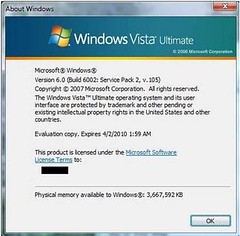
As SP2 is in pre-beta stage, it’s a good practice to create a restore point or back up to avoid future problems.
If Windows has not started updating automatically, follow the below procedure to start the update:
1. Type Windows Update in start menu search box and hit enter.
2. In the left pane of Windows Update, click Change Settings.
3. Select the option named “Install Updates Automatically” and click Apply to start the process.
WARNING: Create a backup of your Vista as you are going to update to pre-beta which might not be stable. Do at your own risk!!
jane says
how do i download windows vista service pack1
admin says
@David
You can now downlaod Windows Vista SP2 from Microsoft itself. Download Vista SP2.
David says
i pressed search for updates did not find any
Rufor says
Hello,
Thanks for links, just downloaded
Thanks
Rufor