Recently, we talked about the launch of Outlook.com email service and also how to rename your existing Hotmail, Live, or MSN address to Outlook.com. While majority of users who have moved from Hotmail and Live to Outlook.com are enjoying the new user interface and features, a small percentage of users want to switch back to their previous accounts.
Many users who have renamed their Hotmail and Live email address to Outlook.com want to switch back to their previous email addresses. Users can revert to their previous email addresses by following the given below instructions.
Please note that this method works only if your previous Microsoft account was Hotmail or Live ending .com, .jp, .es, .ca, and .au. Also note that this method doesn’t work if your previous account was @MSN.com.
Go back from Outlook.com to Hotmail, Live or MSN email address
Step 1: Visit this page from your Internet Explorer or any other web browser.
Step 2: Sign in with your new Outlook.com email address.

Step 3: Under Other email addresses, click the Remove link (that appears below your current email address) and then click Remove button to confirm.
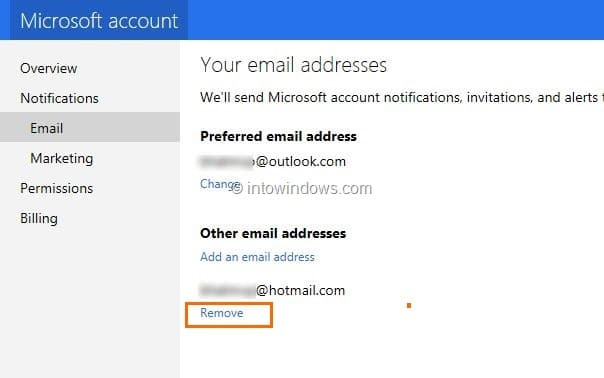

You will see “You’ve removed an email address from your Microsoft account” message.

Step 4: Head over to this page in your web browser and make sure that Create a new email address is selected.

Step 5: In the New Microsoft account box, type in your previous email address and also select your previous domain (Hotmail or Live) and finally click Save button. You will see “You’ve changed your Microsoft account and your new Microsoft account is [email protected]”. You are done!

Please note that it might take an hour or more for your new address to appear in the Microsoft products and services you use.
From now onwards, you can use the previous email address to sign in to all Microsoft services just like you used it before.
Switch back to Hotmail user interface:
Hotmail, Live, and MSN account users who aren’t enjoying the new Outlook.com and want to switch back to the old Hotmail user interface (layout) can simply click on the Settings “cog” icon present in upper right of page and then click Switch back to Hotmail user interface.
Shari Tarragano says
I made a mistake by trying to change an old email address to a shorter one but it had to say outlook in lieu of hotmail.
Then I was told you have to wait 30 days later till 12/2 and thought my account was locked or deleted. If I try to go into “manage your account” and then “your info” and add the old alias back it states it’s reserved. I want to believe it’s still reserved under me but won’t let me login. Anyway this can be changed back? I can’t delete the new alias until I add the old which the system won’t let me do. I also have a screen shot of this message as well. I will provide the new email below.
PO'd says
The MSN homepage has gotten progressively worse and worse culminating with their newest offense of their clickbait picture stories that have a blank page that puts all the rest of the pictures out of sync with the text under the picture. What imbecile got paid to do THAT? On top of all of that is their gawdawful Outlook email. Like every other person who commented here about Hotmail, I agree….it worked and was fine to use. When they initially changed Hotmail to Outlook I was PO’d but had to try to work with it. It soon became apparent that it was a platform for severely handicapped children who work there to continually change the format seemingly to justify having a job. After the forth or fifth iteration I started calling Outlook LOOKOUT!!! It seemed appropriate. I have written several nastygrams via the FEEDBACK link on the MSN homepage but I’m betting that it’s there simply for the hosts to go to everyday to have a good laugh and to see who wrote the most incensed complaint about their site. I NEED a new homepage with similar content but none of the BS. Wow…just, wow.
Jules says
This article says it was updated in May 2019, but it still says:
“Hotmail, Live, and MSN account users ……can …….. Switch back to Hotmail user interface.”
That button was removed long ago ….. and if its still there somewhere, it is VERY well hidden.
BUT occasionally it is possible to get the “Light” version of outlook.com … which has some resemblance to Hotmail.
Does anyone know how to get this “LIght” version?
Bob says
Evil nerds at Microsoft should be exterminated for this. have I made myself perfectly clear?
dakota says
I follow the steps and everything but it doesn’t let me actually remove it, the window will pop up but it’ll go back and do nothing. It’s like they’re, “oh yea, that is nice…..nope!”
Thomas Crater Jt says
Please give back my regular e-mail address. I do not like this. Please.
Deano_51 says
Actually guys this all makes sense. Windows XP was awesome. Windows 7 was awesome. Hotmail was awesome (been using hotmail since 1998). Now we have Windows 8 & 10 which are the 2 worst operating systems in my lifetime and Outlook webmail which is the worst webmail in my lifetime.
The only reason I still use hotmail/outlook is because I have been using the e-mail address for so many years I would have to update it on about 10,000 different websites and applications. Maybe the next Outlook “update” or the rapidly increasing amout of spam which does not seem to get filtered anymore will push me over the edge, who knows.
It’s clear that Microsoft saw Apple rise to prominence and rather than provide PC users with an alternative type of operating system (i.e. great operating systems like Windows XP) or webmail (e.g. the pretty much perfect, old, working Hotmail) they just decided to copy Apple which has alienated old school PC users like myself.
It won’t be long until Windows no longer accepts mouse input…… sad :(
DIRK says
I put up with the new format of hotmail – even though I hate it. For months now it has been randomly crashing on me. It says I am not connected to the internet – “Cant’ find the Server” – Yet I can get to all the other websites I like and use. If I let is sit for a few hours – or days – it lets me back in. Ain’t NO ONE got time for that.
Been on the phone with support for hours – they can’t figure it out. If I could call down one meteorite from space I’d center punch Microsoft headquarters.
Why does Microsoft come up with good ideas and then “improve” them until they are unusable?
Startpage.com now offers encrypted email that is reliable and well supported. It has a small per year cost but I might go that way. Clearly Outlook has become a bloated pig that can’t get out of its own way.
Joseph says
I never gave my permission or authorization to any one to change my email or/nor its format!!!! Do not infringe upon my rights of choice…i have enjoyed hotmail since 1999. What is wrong with you it people? Since you seem to insist that you know what works best for me and just stop me from using my hotmail account i will give notice…if i dont hear from your public service people and have my account restored to its original format and choices within 10 days i will assume that my patronage is meaningless to you and just close the account altogether…10 daysand yes i have noticed that all of the posts saying that they been able to return to hotmail are at least 4 years old.
warezwolf says
congratulations to the new Microsoft Department of SUCK. You guys are obviously very skilled at taking awesome products and making them SUCK. Seems like the WHOLE of Microsoft has now joined your department or at least adopted it’s policies. Good bye and good riddence MicsroSUCK.
Elke says
Being at outlook.live.com feels like being back in the 90’s. So old-fashioned and lacking in many aspects!
I am considering switching to Gmail, while I have always been so positive about Hotmail…
Lynette Lyon says
The calendar is all mucked up too. Has anyone noticed. Entries that were already in (past or future) are showing up on the day Before they are meant to be.
Hating it too!
everyone says
If you are responsible for the changes to Hotmail, go kill yourself. You are shit.
phuch says
Another fine POS product “update” that only MS are able to do. Why dont you simply tell us to go somewhere else MS because you can’t be serious here with the fucn outlook that we are having to deal with now. It is an absolute horror and tThe slowest most ridiculous webpage I have ever had to be on. It’s like being in the 90’s. And now you made me use my other outlook to get the 4 digit code which I got and put into the link and now you ask me to remember my initial sign up info which I did not and you blocked my main outlook citing safety. Go f$&*^* yourselves.
al says
I hate this new web based Outlook.
For some reason it seems to randomly mark emails at read that I have not read. Very annoying and time consuming. I HATE IT!
Wendy says
They changed my log in screen to two separate pages – first page to type my email address then “next” and then type my password. Why? I was quite happy with my login page.
Today I refresh my page and I have this hideous outlook layout. I can’t easily refresh, I can’t easily move my files from inbox to a selected folder.
Hotmail was the bomb but microsoft are murdering it. I would like the option to change my layout back to the simple format that was there.
Why change something that was simple and easy to use and view.
HATE this new change so much.
Tony says
Absolutely hate this view. I logged in one day and it changed, no prompt or choice… nothing !!!!
It’s so sloooowwww !!! Give me back my old view or I’m definitely changing to another email provider.
BAD BAD BAD BAD…. HORRIBLE !!!!!!!!!!!!!!!!!!!!!!!
Alan McAulay says
It’s now awkward, clunky and an unpleasant user experience. I didn’t complain immediately. I gave it a chance, but it’s horrible to use and unsightly to look at. I’ve had this email account since my first day online 13 years ago, but I’m gonna let it go if I can’t get something like the old view and usability back.
Sam says
I ABSOLUTELY HATE THE NEW FORMAT! Every time I go to check me emails I get the ‘rainbow wheel of death’ and I have to log out without checking my ‘insert swear word here’ emails. I see no advantage to this format change – it’s really frustrating to use. PLEASE CHANGE THE BEEPING THING BACK. .. or I’m off to gmail or somewhere less stressy because I can’t be doing with shouting at my computer on a daily basis – it’s not fair on the neighbours.
Nick says
This new layout is crap..I am now going to slowly make Gmail my primary email account and phase this out.
Lyn says
Hi,
After so much frustration with the new Outlook.com, I was so happy to find our site. I immediately followed the instructions up to Step 3, which is to REMOVE my old email address.
However, I could not perform step 4. Everytime I tried enter my old email adddress, either ending with @hotmail.com or @outlook.com, it kept saying back to me that this email address has has already been used/taken.
Now I can’t get back to my old email address. I had this hotmail address for 19 years or so, and now I am panic because I can’t get into it. I haven’t had the chance to back it up. There are so many to backup.
PLEASE HELP.
thanks
Lyn
James says
Not only do I absolutely hate the so called improvements but the settings don’t even offer the switch back to hotmail option seen in some videos
Why must you destroy peoples lives with this crap…unbelieveable
Mohammed Siddiqui says
This is the worst Microsoft idea.
The new outlook format instead of my hotmail is really really stupid.
If Microsoft doesnt change this back, I’m gone
ivan says
The new look that I was just given sucks ! its all bright white with yellow at the top and I can’t use scroll bar or the whole screen turns white…can’t use arrows to scroll down…they won’t work…how do I return to the old look !!!!!!!!!!!!!!
Danny says
Really Really disapointed with this change cant belive that a compny would just change things without giving you a choice, i hate the new interface and just not happy working with it.
Grace says
I totally agree with everyone’s comments. What happened?? Please let us switch back to the old view. This new view is AWFUL!
j says
I really really hate the new hotmail layout, sorry Microsoft this is not the way to treat your loyal customers
SEBASTAIN says
I HATE THIS STUPID NEW OUTLOOK INTERFACE!! PLEASE SWITCH IT BACK OR I WILL DELETE MY EMAIL ACCOUNT OF 18 YEARS AND JUST GO TO GMAIL!
Carol says
Seems like I get a new surprise every time I open my hotmail. “Oh looks like they changed something else to make it look stupider. Oh looks like someone messed up the organization part even more.” What a freaking joke. I am disgusted with how many changes you guys have made AGAINST our wishes. It won’t be long before everyone is fed up enough to leave. (I am actually wondering if this has become their goal because of all the inconvenient things they have done in the last few years and especially recently!) Come on hotmail. I used to love you. We used to be good friends.
kara says
I have HAD! IT!!!! Hotmail was and is my main email! I can hardly stand using it because of all these new [STUPID] changes. If your goal is to lose as many customers as possible, you’re doing a great job. Quit changing everything on it or at least give us the option to keep our old look back. AND!!!! Why can I all the sudden not receive pictures? AND!!!! When I try to open attachments now, it just shows up as ‘Documents’ so I can see that there is an attachment. I just can’t open it! YOU GUYS SUCK! CHANGE IT BACK!
JF says
AWFUL!!!!
I have had my Hotmail address for over 12 years and everything was going fine. Then I wake up today, log on and now have the new outlook format and it’s so convoluted and tangled up. If Outlook is trying to go bust – it’s doing it on the fast track because I cannot imagine anyone sticking with Outlook’s BS way of treating loyal users.
CHANGE THIS BACK!!!!!!!!!!!!!!!!!!
p.s. I can barely read my emails because they are now so light in color. How is this improvement????
Richard Bell says
I woke up this morning to discover that Microsoft had hijacked my Hotmail account, and substituted an entirely new interface. I suppose there may have been some warning messages, but I have always treated all communicatiions about my Hotmail account being too full, or needing this change or that change, as being attempts to inject some malware into my computer, and never even open them. Now I find that Microsoft has inflicted its own malware on me anyway.
I was in the middle of a multi-email project, which has now gone all to hell because the buttons on the new interface are in different places, and some of the previous functionality appears to be gone altogether. To make matters worse, when I type a name into the To box, the pathetic software behind this new interface grinds away, taking 20 to 45 seconds to come up with a single email address associated with the name I typed in the box. Why would the company have inflicted such a dismal slow product on us.
Unless I can figure out some way to quickly restore the interface and functionality I had just yesterday, I’m going to be looking for an alternative on Monday. Any body have any usual recommendations? Thanks.
john says
I F………………..ing hate it. Our lives are being controlled by geeks who have nothing better to do than play with their f………….ing computers!!!!!!!!!!!!
Chris says
Agree with everything said – outlook sucks – and really like the way it was forced on us. Not intuitive, slow, and buggy bring back old system as an option
Michelle says
I am disabled and cannot get my head around the new outlook that MSN has forced on me this week. As a loyal customer for years I am disappointed and feel that MSN has not considered its customers we should have the choice to say at the easier old style interface. I cant use this one and think its an abuse of your customers especially the older and infirm or people who don’t want the new fangled complicated new interface. Please listen to us and give us the option to go back to the easier interface that it was.
Arour says
There are no Switch in “cog” icon. Any other methods to switch back to the hotmail interface?
Lika says
HATE this forced upon the hotmail user awful outlook!!! Agreed with all of these comments! What kind of hijacking is this??? Change it back! NOW.
Ma Luv says
Absolutley HATE Outlook mail. I have wasted so many hours trying to set up and modify/manage contact groups now called “lists” Absolutely AWFUL. Not at all intuitive. I DO NOT HAVE TIME FOR FAFFING ABOUT. I need to WORK!
Mariano says
Tired of this Outlook interface, gave it some chanches but NO. Really works BAD. Crashes… doesn´t open my mails sometimes. really disgusted by this. It doesn´t even give me the chanche to use the LITE version…
I try to open a specific mail and says: Select an item to read…” in my case in spanish “Seleccione un elemento para leer” and doesn´t display the mail itself.
Dirtdevil says
Am I the only one who cannot stand the new outlook interface on hotmail? Everything is sluggish, you click on an email to read it, and it’s not loading, you keep clicking, and nothing happens.
I don’t know what type of programming is behind the new website but it’s not making any sense.
R Dey says
I too do not like the new outlook mail….Hotmail was my main email. I would like to have Hotmail back..
Judith says
After reading the latest comments I now know why my computer has been so sluggish.
Have had my Hotmail address for 16 years and have always been happy with it. Now I am upset. Recently there were changes to Outlook.com which I hated, now today upon opening I see a completely new style of page, which I hate even more. I can’t click in the box next to an email to delete it or move it to another category etc etc
Seriously considering transferring to another email provider if I cannot get back my old Hotmail.
As others have said, these changes were forced onto us and I absolutely resent this. I don’t give a damn about formatting etc etc. I just want a simple to understand/use email service.
trevor says
I cannot stand the new look , change it back to hotmail
thwarted and despondent says
Just adding my voice to the tide of disgruntled users who woke up to find the new outlook interface instead of hotmail as was. It is TERRIBLE and is costing me time and impacting my mental health!
It’s gone all gmail-like in it;s ugly layout of the inbox, is SOOOOO hard to scan visually.
I cannot believe that focus groups said this was preferable over the old visuals.
I have to use gmail for work and find it completely annoying in trying to follow threads and know which is email is new, how to reply to the one I want not to some other email in the thread and now, the same has happened in hotmail.
JB says
The unwanted upgrade has cost me so many hours trying to find, edit and/or recreate work that has been functioning well for all of the years I’ve used Hotmail. As I’ve read others disgruntled comments, I agree with so many of the things others are upset about.
As a member of many organizations, I have had “groups” set up in my email to quickly send correspondence. What a nightmare it has now become. On a recent group mailing only a portion of the “group” was included (and somehow members who had previously been deleted were added back in). When I did a search for the “group”, suddenly there were these colorful circles with initials (or just the colored circle) and sometimes the persons name was below. Some of the group members were listed alphabetically by name, some by email address and some by their phone number. So my email sent to several peoples office phone numbers. It was a total nightmare. I’ve tried to reconstruct one of my groups and no matter how many times I edit a persons information, the email will still go to someones phone number.
I DESPISE this Outlook, especially since I can’t find solutions for any of these problems – other than to switch email providers !!!!
Luuk says
Outlook.com sucks! Bring back hotmail!
Alan says
Agreed with all of these comments. Change it back. NOW.
ps. THERE IS NO OPTION TO REVERT TO THE OLD INTERFACE AS SUGGESTED.
Distraught says
I’ve sit here for two hours trying to find previously saved emails, and another hour and a half reading through articles trying to find how I can revert back to the “old” MSN email. I am so upset.. Emails I have saved from people who are passed on are gone. In fact, every email going back to mid-July is gone….many of those were business emails and backups for my website. On my phone everything is wiped out for the last three years – so 2013 emails are there – and everything before that and after that is gone. No, I don’t save every email I ever get, but invoices, billing statements, special emails etc. are saved.
I’ve had this account since the beginning of time and I”m so upset. I can’t get the emails to open correctly, and if I try to delete one it takes nearly a minute to do so – I know because I timed it. AND, it takes over two minutes just to load the email page. My computer isn’t slow or bogged down and I never had a problem like this with the other version.
If I’d wanted Outlook, I would have installed it myself. It is not my choice of email clients at all, I looked into it years ago and didn’t like it then and I still don’t. I believe that the reviews and comments need to be read by someone because it’s obvious that we users don’t want this change. Please listen to us!
Kurt says
I actually switched to Outlook.com from the horrid Yahoo Mail, after many years, because of forced “upgrades” and resulting slow, unreliable performance. For a few years it was great. Fast, simple, clean. Now?! As bad as Yahoo Mail got. If anybody finds a solid long-term alternative, please post here. Microsoft, you had a good thing going for a little bit, but forced upgrades, like you do with Windows 10, will result rightly in an exodus from your products.
JCA says
Outlook is disgusting, confusing, folders are not easy to handle, etc, etc. Microsoft: please send back our hotmail.
Jean Macesich says
I am so angry about this. Now, when I am away from a Wi-Fi, my phone doesn’t even show my iCloud email account. It also resorted my email accounts when I AM on Wi-Fi and put my Hotmail at the bottom of my three accounts. I use my email for business and other volunteer organizations. I use separate email accounts for a reason to try to keep my life organized. My friends are asking me which email address is right because now I have this “live” account. By the way, I tried clicking the cog since I have the “live” account and have no “switch back” option. Nice job messing up people’s emails, you can no longer block junk. It’s just ridiculous. If I didn’t have so many years of emails I have to have for my volunteer business, I’d delete it right now!!!!!
Rena says
I agree with all these comments. I do not like the outlook interface. someone paid $99 to Microsoft to get the old interface back?
Marian says
I alsohate thism Outlook and cannot switch back. My group folders were wonderful. Now I cannot use them or send notices to my list of clients. HOrrible I just spend 3 hours trying to revert back to Hotmail. HELP. Can I call for help somewhere?
disgruntled citizen says
the required fields were filled in. I guess you just didn’t want to hear what I had to say. Nice WE
disgruntled citizen says
Well, it was bad enough the first unwanted undesired and unasked for switch to this stupid ass outlook in the first place. Now, it is virtually impossible for me to use and has cost me so much time and money, I cant even begin to tell you. Plus, it is the slowest damn crap I have ever seen now. I don’t know what their end goal is. As we can all see and they can see — if they actually read — from the multitude of messages above customers are extremely disgruntled over this nonsense. They will succeed in all of us leaving and finally going google on them. I guess that is what they ultimately want – out of the email business. Boy, what a horrible way to achieve that goal. I cant even say any more, as I either need to write a book and become totally profane or smash my computer. I have never had something inanimate create such pure fury in me!!!
Larry says
Every time I click on an email to open I get a new page that asks me :
Click here to open the first email on the list…..or something like that.
I can not get this to go away no way no how. I’ve tried the Settings over & over.
I want to physically beat to a pulp the person that has made my life miserable. This is a Business email for me. It is now slow as molasses in January and has a mind of it’s own. What in THE HELL were you people thinking ? It’s a mess.
Darla Jones says
Ugh! I’ve lost my flagged emails with this change. THIS IS HORRIBLE!!! I absolutely hate it. We have this crappy version of Outlook for work, too! CHANGE IT BACK!!! This is ridiculous. Extra steps to move a message. Flagged emails gone. I am livid!
Betsy Ettenson says
F. Birgman, I agree with you!! I was not on my computer yesterday at all, then today (Sept. 22nd) I got on to check my email and was VERY disappointed in what I saw!! I can’t believe the EXTRA MOVES you have to go through just to put an email into a folder!! I liked it better when all the folders were visible and I didn’t have to physically “pull” the list down. And then, you have the extra step of having to hit the button “Move” to actually PUT the item into the folder. I miss the boxes on the left side of the emails – they only appear when you actually want to do some kind of action with that specific email. I don’t like all the extra gobbledy-gook when I want to compose a new email, either. I haven’t tried everything yet so I haven’t figured out what else is “wrong” with the new “look” (I guess that’s what you mean by ‘interface’?) but from what I CAN see, all I know is I want the format back that was dated Sept. 20th, 2016.
And Jeannie C., (and the hundred others who also posted this comment) I, too, checked out the deceitful ‘settings cog’ to supposedly switch back to the old Hotmail and found there was nothing there. See me frowning??
I have had my Hotmail account for 15 years, but it looks like I need to venture out of the box and check out Gmail, which the rest of my family has had since its onset. I also laughed at this: “While majority of users who have moved from Hotmail and Live to Outlook.com are enjoying the new user interface and features, a small percentage of users want to switch back to their previous accounts.” HAH!!! They had better read these comments and they’ll see that the majority HATE the new format and didn’t even ASK for it!! PLEASE give us an option to revert back to our previous version. Thank you.
David says
Hotmail should give its users a choice, either the old version or new. Not just change everything without contacting its users. I fear pain ahead to change all of this back….
The new look looks awful and keeps crashing
Kain says
Agreed with everyone, this new forced Outlook move is terrible and Outlook itself is nothing more than a turd in programmed form. I had settings for redirecting emails and filtering them to specific folders — all gone! So, I go into the settings to set rules for delivering to folders (indeed empty!) and go on to re-enter them. Guess what, it doesn’t even work even though it’s entered clear as day! And the interface is so slow… My hotmail was my main address since the late 90s, but now I’ll be switching to my Gmail account has my main.
Ty says
How do I change back to my old Hotmail interface ? this outlook.live stuff is terrible and a big mess!!!
Faiz Ahmed says
Please return us our old hotmail.
Your new outook is total crap.
F. Birgman says
I have read all of the above and I cannot agree more!!!!!! The OUTLOOK is a bowl of Crap!! I also have had msn.com since I am guessing the late 80″s I was quite Happy with it. I had all of my other email accounts changed to the msn.com and now I am preparing to change my msn to another email interface that is more user friendly and that don’t require going to extremes to find created folders. Your Outlook team needs to find another Outlook on emails.
Kurt says
Woke up and signed on to Hotmail today and it’s no longer there! Not only that…..no printing messages, no bold, no underline, no italics, no font changes, no color – NO NOTHING! This really really really s–ks! Oh yes, right, the excuse is that it is “free.” I opened this hotmail account in 1994 (not a typo) and now I have to deal with this second rate crappy stuff? Microsoft – thought you hire intelligent people?????
Robert says
I can’t search or use any drop down features since you changed from Hotmail to Outlook without asking me if that was ok. This new interface is a load of bloody rubbish. You are costing me time and money as I cannot connect to customers as I used to
Useless, bloody useless!
Irmgard Vitzthum says
I agree with every word I have read above.
GIVE US BACK OUR OLD LAYOUT THAT YOU TOOK AWAY FROM US TODAY
with its nice, practical icons for FORMATTING the fonts, the file-row on the left as it was .
IF I WANTED OUTLOOK, I WOULD LONG HAVE HAD IT – BUT I LOVED MY HOTMAIL.
I’ll tell you one thing:
Whoever came up with this, is a blockhead and HIS ONLY AIM in LIFE seems to be to MAKE OUR LIVES DREARY AND DULL. GIVE US BACK WHAT WE LOVE!!!!
Jeannie C. says
I didn’t agree to have my Hotmail mail service switched to the new Outlook mail service! I want the Hotmail mail service that I was using prior to the unauthorized switch by Microsoft to the Outlook mail service!
And, by the way, whoever created
‘Switch back to Hotmail user interface:
Hotmail, Live, and MSN account users who aren’t enjoying the new Outlook.com and want to switch back to the old Hotmail user interface (layout) can simply click on the Settings “cog” icon present in upper right of page and then click Switch back to Hotmail user interface.’
must be off their rocker. THERE IS NO OPTION TO ‘SWITCH’ BACK TO HOTMAIL USER INTERFACE!!
Still another deceitful move by Microsoft.
I DEMAND the option, provided by Microsoft, to switch back to Hotmail user interface!
Frustrated Hotmail User says
“While majority of users who have moved from Hotmail and Live to Outlook.com are enjoying the new user interface and features, a small percentage of users want to switch back to their previous accounts.”
LIARS! Read the comments and listen to the feedback for a change! The majority HATE IT!!
Slow, clunky and a complete mess. What a total load of crap!
Now i need to redirect to another provider. Disgraceful
Sherry says
This is rubbish. I never asked my friendly HOTMAIL to be changed to useless OUTLOOK!!! It is sooooo slow and takes ages to loaddddd. I am very disappointed, nowadays I dread checking my mail and this is coming from someone who checked their mail atleast 10 times a day.
I dont know if they even bother with our feedbacks, just so tired of being forced to something I hate, why cant you idiots leave things they are, some shithead thought oh this Outlook crap is going to be great but let me tell you something this was the last thing I needed in my lifeeeee, congratulations you made my life even more miserable to live, I wish you and Microsoft nothing but the worse, you have not even left us with an option to switch back to HOTMAIL.
I hope that one day you pay for the damage you have caused everyone here. you ruthless idiots
pradip devalia says
What a @#*^ing joke. Typing an email lags, screen freezes, sending email keeps going round in a loop and above all, you get these useless , mindless, tiresome, ads and videos starting up. I just want my email to work…is this too much to ask microsoft? If you can’t I am going to change to gmail (despite all the inconvenience of changing) and stuff you all.
Sue Pemberton says
I agree with all the awful things everybody said about the new Outlook interface. I want my live.com Hotmail account back exactly the way it was. I can’t even begin to understand instructions of what to do, so I want it fixed by whatever moron “unfixed” it in the first place.
Gary Peck says
I never gave permission to change my Hotmail to this outlook crap, now I cant even get to my email that I trusted was safe and important, I want it changed back I kept denying the you wanted me to update to outlook but you done it anyway, I am really really pissed at moment
diaco says
please help me to uninstall Outlook, I do not have this option “Switch Back to Hotmail”
GB says
WHY!!!!!!!!!!!!!! i detest the new steup – i cannot get back to Hotmail as no settings icon – where has my extra folder gone with saved emails – you are stupid whoever designed and made this happen, i hope you end up eating from the gutter
promet kandise says
Everytime they upgrade, it gets fucking worst ! Its that slow and sticky I don’t even wanna read my emails anymore. Useless primitive wankers ! My spectrum 40k would loads games faster then opening an outlook email !
Daniel Holtum says
omg i can’t believe this has finally caught up with me damn its so nasty PLEASE GIVE ME MY HOTMAIL BACK!! What is this win10 looking trash oh its the outlook email bs i can’t even read the emails now unless i zoom in wtf. Hey google mail how’s your day? mines rubbish now! time to desert the sinking ship known as outlook and join gmail :)
Scott Lekas says
Fuck you Outlook. We deserve choice. I want my Hotmail back. Scott
Annoyed says
Hi discovered this new thing yesterday thought was temporary and like everyone I HATE IT! Its reorganised my emails in alphabetical order and sayg ii have unread messages in Inbox but WHERE ARE THEY?? I never asked to be changed please get my original Hotmail as this is crap!
NINA ALOO says
TAKES AGES TO LOAD!!
vera says
this is the worst. why didn’t they give us a choice…it’s awful, terrible, hideous and so unfair Microsoft to do this to their customers. I want to go back to Hotmail or I’ll change to another server.
Dennis says
This new format sucks. Please switch it back to the old one. This one is slow and inefficient, I absolutely HATE it!
Zoe says
In the settings cog i cannot ind option to switch back , i hate this miserable outlook, its a great mess!
awtar says
All I can say/ask is I hate the Outlook interface can I have my Original Hotmail
Interface back, I did not ask for the Outlook interface if I wanted it I would have
requested it this is all I ask my HOTMAIL INTERFACE BACK PLEASE.
E says
i agree with everyone’s comments – this format is disgusting and not user-friendly. I have noticed LOADS of junk mail suddenly coming in as well.
Disgusting!!
Good luck all!
awtar says
To my HORROR today I find my Hotmail is now the DISGUSTING OUTLOOK INTERFACE THRUST UPON ME WITHOUT MY PERMISSION.
I ALREADY HATED MICROSOFT AND NOW THIS WELL IF MY HOTMAIL IS
NOT RETURNED I WILL SWITCH TO EITHER GMAIL OR ANOTHER MAIL
PROVIDER.
GLAD TO SEE LINUX NOW MAKING GREAT INROADS CONGRATULATIONS
MICROSOFT HAVE BROUGHT AN END TO THEMSELVES WELL DONE :).
eddie says
Microsoft Outlook Mail is so bad, slow and unresponsive, and attachments slow to open.
everyone will move to alternative emails.
Microsoft, you hurt people by tampering in their email accounts, and forcing changes, same like
the Windows 10 push against one will.
I think its time to create a better PC and email company.
Microsoft, just go away and never come back
I HATE THE NEW EMAIL LAYOUT says
MSN outlook new change sucks. no one ever ever care to listen. i have sent numerous and feedbacks. begging for them to change it back to older version of my outlook email. this new change is horrible. i hate it. what can we do people?
katie says
This new email format is HORRIBLE. WHy would you not give us the option of using the original format? This is not even close to G-mail, which it’s obvious that you are trying to be. You have really screwed up a lot of users and now that there is no reverting back, I will be telling all of my contacts to find me at my gmail address moving forward. I have always preferred using this email account, but not anymore even remotely. Stupid job, Gates.
Aileen says
My hotmail account was switched to outlook mail format without any warning, this is SO inconvenience, annoying and frustrating! For business people, every single minute is valuable, why would Microsoft do this to us? Can you listen to people and do something about it???!!!
Patrick O'Donohue says
All the advice about switching back to Hotmail says; click on cog icon and click on switch back to Hotmail. My menu hasn’t got that option, what should I do? I hate this new ‘thing’ with a deep hate. Haven’t the designers ever heard of ‘function before form’?
camperfield says
Absolutely hate the new version of outlook. Contacts are screwed up, downloading attachments takes 3 more steps than before. Not to mention the layout. I use this email account for business and it sucks, thanks for making my job 10 times harder than it has to be Microsoft! I will be getting rid of this email account asap!
David says
This stupid incoherent format has just screwed up a lot of business people who rely on hotmail. Horrible that you would do this. The format is ridiculously pitiful and confusing
Tom Hanks says
I HATE HATE HATE this new look. I did not ask for it. I want my old Hotmail look back. Did I say I hate it!
Microsoft arrogance again.
Crashley says
What arrogance.
Again, a change is forced upon the user without their instigation.
If I wanted to use ‘Outlook’, I would have installed it. I didn’t.!!!
We, the customer, the end user, must step-up and complain.
The other option is to ‘vote with your feet’ and select an alternative electronic-mail host.
Microsoft, you have done it again.
Gregory says
They have yanked this option. Hotmail now uses the Outlook format, and it is no longer possible to switch back.
Ben says
I’ve been with Hotmail since 1997, but the new god-awful layout is so inefficient. I want the sender in column 1, and the subject in column 2, not all blurred together!
I’m just going to create a Gmail account and forward my Hotmail to it. Quite a sad day.
Keith says
I had this stupid outlook for 3 years and I still don’t like it and if it doesn’t get switch back…. I am dropping my email address and not use this stupid microsoft anymore. My rating for outlook is a big fat Zero…. I want it changed immediately
Franko99 says
Do Microsoft ever LISTEN to what people (i.e. CUSTOMERS) say ???
MSN is a waste of space…..slow, ad overloaded, and irrelevant to most email customers.
I started with Hotmail virtually from day one when it was fast and just did emails.
It didn’t change for change sake. We got used to it and loved it. It was just hot mail and did what it said on the tin!!
PLEASE: Just give us a simple email service. We don’t need the other bolt on crap.
My previous company, a large auto maker, switched from Microsoft to another provider as it became too cumbersome, slow and costly.
Do us a favour, and yourselves; Give us a good, old fashioned, stand alone email service.
OK, stick with Outlook if you like, but give us an option of Hotmail only without the bolt-ons.
When we’re dealing with loads of emails every day we don’t need the excess baggage.
We don’t need change either. We get familiar with it. We use it as a work tool. Purely and simply.
PLEASE: Commit yourselves to a non-changing, stand alone, simple email service.
I’d pay a sign on fee to save me the pain of switching providers and email addresses.
Hotmail.com might be a good model to base it on.
Bec says
when i click the cog it doesn’t give me the switch back option???
R.K. GUPTA says
My live.com account, ****@live.com has been automatically switched over to Outlook format. I am not comfortable with OUTLOOK format, also I am not able to download attachments with my E-mails. Please restore / return it to my earlier live.com account format without loosing any data and attachments. Kindly restore / correct it.
cleo says
This new look sucks. Not able to change it back either did all the steps now I get nothing this fucking sucks need to change it back this is stupid. I use email for work & Shit this fucking sucks change it now !!!
Yesterday NOW!!!!!!
Joyce says
the new MSN OUTLOOK appearance is DISGUSTING! Can I please have the old live, hotmail appearance back ASAP. This is why MSN is going downhill. . . why are you changing without people’s authorization! ? ! ? ! ?
please change it back ASAP.
Ava says
MSN is disgusting for this nonsense. Many of us dislike outlook. Which was forced onto us. It was created sloppily & usually is a pain in the rear to use. Good jobs guys. HATE HATE HATE …expected more from MSN maybe gave you guys too much credit
Donna says
I hate outlook so I called the microsoft number. A foreign man told me that outlook was tracking my emails and that the only way to switch back was to pay him $99. He then switched it back for me. Sounds like microsoft has quite the scam going. Now they have done it to my dad and my business account too. This is disgusting.
violet says
I hate it I want to change it back. How do I do so! I hate outlook!
Nino says
I thought I was the only one who was SOOOOO MAD!!!
I HATE OUTLOOK AS WELL !!! It used to have option to switch back to hotmail and not anymore.
TOTALLY HAT_E IT!!!
Darlene says
I want to change back also — the option is not under my “cog” to switch back. And the email option in the first instruction is not there either.
Please help me this is a law office email and it is so slow and irritating.
Peter says
I hate it and they switched it on me. Call it friendly hijacking! I want to change it back. How do I do so! I hate outlook!
Ush says
It really sucks, it’s ugly, not to manage, very very dull appearance, Borring look instead of outlook. Really HATE IT…
gregory says
This sucks how can i change back to hotmail.This should be mail tampering
Nour says
I hate outlook!!!!!! my account has been switched to it without asking if i want to!!! i hate that! i want my hotmail account back =/
Elli says
I would also like to be able to go back to the Hotmail interface.
This outlook interface looks shocking…
Terrie says
There is a cog but when I press it there is no option to switch back yo my original hotmail. I dont want outloook, I dont like it. I want back my HOTMAIL….. program. Thank You.
Mike Prokopowicz says
You people had no right switching me to outlook..it is awful..this is an invasion of my privacy switch me back to hotmail now please and get off of my emails for good..delete all of your crap and do not ever do this again..sincerely Mike
carlos says
this is invasion of privacy. Kindly switch back to old live.com.
Danny says
Never asked to change over but hotmail did it anyway, some cheek they have, if it cant be changed back over they can shove it where the sun dont shine, never seen such a load of crap, its pathetic,who ever thought of this is a retard and needs sacking, if hotmail works ok then dont fix it
Yolanda says
My hotmail was switched to outlook without my permission. Please switch back as soon as possible. I did not approve outlook. Please switch back to hotmail.
claudette says
It is a scam from hotmail and overlook who has for money to return your old hotmail. they are all scammer.
Tina O. says
I was never asked to switch to outlook mail, if i wanted that id use outlook express. I do not like the bs you pulled and want the hotmail interface back. This shit sucks. I do not have the switch back option under your cog/gear (whatever the hell you call it), so you need to find a way to force the switch back to the hotmail interface.
Duane says
Well this did NOT work and now I have lost any access to my previous hotmail.com account. I am not a happy camper.
doris butler says
i DO not like outlook. i did not change to this but it was done. i want to go back to hotmail.com. clicked on the clog but it doesn’t show a …switch back to hotmail…option
Nancy says
The above live.com email account has been automatically switched to Outlook. SWITCH IT BACK TO LIVE.COM.
Nancy says
The above live.com account was switched automatically (not by me and was never asked if I wanted it switched….which I DO NOT). Please return it to my live.com account. You changed it…you correct it.
mona bahi says
Actually i do have the same issue as Natalie, there is no cog what so ever !! … now what .. it’s driving me crazy
Natalie says
I was just reading information on outlook, but for some reason on its own,it decided to switch my hotmail account into that. I need to switch it back but there is no settings or “cog” icon for me to click on. In fact, there is no icon whatsoever. How do I proceed?
Lima says
The only thing that I’ve to do is follow what was written at “Switch back to Hotmail user interface:” paragraph and do it. It runs pretty well.
ab says
I can confirm this technique works.
I was able to receive my old emails as well.
Chris Loscombe says
I have followed the instructions and although I previously had a @hotmail.com address it is only allowing me to create a new @hotmail.co.uk
So what happens to those who have my hotmail.com address now?
ab says
Will it preserve all emails from hotmail.com?
It clearly says you’ll lose all your emails at deletion stage.
Please reply..