If you are a regular reader of IntoWindows, you probably know that I had written an article titled how to create live XP/Vista CD/DVD/USB just a few weeks ago. Few readers had asked me to write a simple article which shows the making of Live XP without any hassle. So, I am writing this new guide for XP lovers.
The art of creating Windows XP live CD
Here I am re-writing the article by assuming that you are going to create Live XP CD. To create a live XP CD, you need to have an internet connection. If you don’t have an internet connection you need to wait for a few days as we will write about creating Live USB drive using another method. Make sure your system is connected to the internet.
Essentials:
1. Winbuilder
2. Windows XP CD
3. Internet Connection
4. Blank CD
Step 1. Download Winbuilder (Free) from here, extract the zip file to a folder called “Live XP” on your Desktop (assuming that you have a minimum of 700MB free space on your C Drive). You can even choose any other drives or folders to extract the Winbuilder zip file. Make sure you have enough amount of free space before proceeding further.
2. Run Winbuilder.exe file from the Live XP folder, below is the welcome screen you will see for the first time. Download screen is the screen where you need to choose the tools, drivers and other applications required for the live CD.
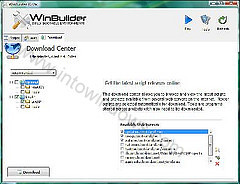
3. Switch to Download tab, uncheck the box named “Optional”, and click the Download button located at the bottom left of the pane to start the download of essential scripts and tools for your XP live CD.
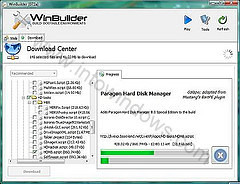
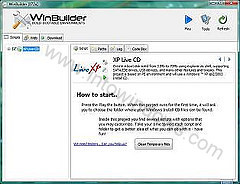
4. Once Winbuilder finishes the downloading process, it will show you the below screen. Click on Play button located at right top.
5. Insert your Windows XP CD into the CD/DVD drive and browse the same from the Winbuilder (Refer screenshot).
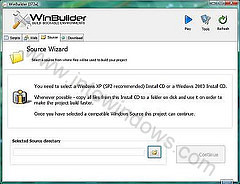
6. Click Continue button to start the live CD building process. It will take a few minutes to finish the process. If Winbuilder process prompts any confirmation message, click “yes” or “Ok” to continue the building process.
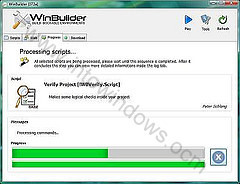
7. Once it finishes building Live XP image, you need to insert a blank CD so that it burns the Live XP image file into the blank CD. Keep the burn speed at minimum to get the best results.
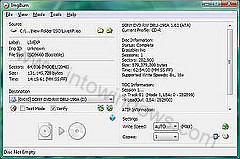
8. If you have followed the procedure neatly, you will have a Live XP CD in your hand.
9. Once you get the Live XP CD, you can insert and check the new Live XP CD.
PS: I tried to use the latest version of Winbuilder before the proceeding to the older version which I used in this guide. The reason is this version is stable than the newer version like XP. So, I recommend the stable version instead of the BETA.
If you have any problems in following the above procedure, feel free to ask your doubt in the form of comments. And finally, don’t copy this article to any other sites or forums without the permission and backlink.
Tiny Tim says
I’ve been struggling through this whole “PE” miasma for days and so far the only disk that works is “Hiren’s”. In reading his info, it seems he has already loaded SATA HDD drivers and USB 3.0. This is why it works. For any of the others, you need to add a SATA driver to the build because your basic XP Install disk doesn’t have one and this is why the Blue Scream comes up. I want a simple small win xp environment just to access my usb stick to restore my backed up image files. I don’t want all the bloatware utilities ’cause I don’t use ’em. Hope this helps you and wish me luck on finding the shortest route to my own happiness.
Tukkie Razcall says
Hi,
I tried several times to make a live CD for XP, but all attempts result in a blue screen after startup.
What am I doing wrong.
with regards, Tukkie
admin says
It’s not up-to-date but should work for XP.
bre pyn says
is this up to date or is there another way that has been made easier.. ? this info is much appreciated either way, thanks
mushahid says
hi when i strat my computer there comes sys32 eror please tell me what iss the solution of this problem
JK says
I am getting various errors. why am i having these errors?????? Help
khalid says
hi , thank you for all this important infermations , i want to ask if i can adds same programes to my live cd like an antivirus or photoshop and so on ? thanks again .
Jay says
The newest Winbuilder didn’t make any iso image anywhere.
I’ve quit using this program.
Jay says
Now my computer is saying Winbuilder [077 RC2] which is running as
autiit3.exe in the task manager is malware.
What’s going on?
Jay says
The complete download stalled with 17.92 mb lefts when winbuilder got an error that it couldn’t find the lisence.
fan says
Hey guys.. don’t try.it wasting your time..
fuckkkkkkkkkkkkkk….. it doesn’t work. stoped with few errors…
admin says
@Sami
You should be able to do that with NLite software.
Sami says
Hi , I have a bootable xp cd and sp3 on other pc from magazine , ms.netframwork 2 , driver genius exe file which has all driver of my pc and windows live , can we make these stuff in on a bootable xp sp3 cd ? can we add some somthing like antivirus or spyware remover thanks in advance
admin says
You should be able to make an ISO.
TrueLugia121 says
i was wondering can i change a step from burning to CD to making a CD ISO Image? or does it need to be burnt to a CD?
saranray says
i need live xp
GARID says
Wow nice but i use rxd ?
Atif says
I am getting after press play button: –
“HoJoPE.exe has encountered a problem and needs to close. We are sorry for the inconvenience”
I put the source CD of windows XP then I press Play button and get above msg.
Deyaa Addeen Fahmy Shedeed says
Trying it now.
thanks in advance.
kylde says
at least 10 errors during the complile, had to CAD it in the end (failed to make dir#4,#5 was a common 1), I’ll stick to PE thx :)